Why I prefer Signal messenger with friends and family
German translation: 🇩🇪 Warum ich Signal als privaten Messenger bevorzuge | Chinese: 🇹🇼 為什麼我在和朋友與家人聯絡時更喜歡使用 Signal
Content
Please send me your phone number
Many people no longer have their friends’ phone numbers because they only added each other on social media, despite knowing each other for years. That is a fragile. Accounts get locked, platforms decline, and contacts disappear with them.
It’s also not very emancipated. Why do you make your private network dependent on a platform that only wants to push advertisments on you?
Phone numbers have been around for over 150 years, since 1879. The international country codes (e.g. +1 for US, +49 for Germany, +886 for Taiwan) were standardized in the 1960’s. Phone numbers are one unique identifier that everyone in the whole world understands. Why don’t we use it?
If we want to stay in touch, we should exchange each other’s phone numbers (and e-mail addresses) instead of being locked into commercial platforms. This allows us to connect in all kinds of ways.
My preferred messenger: Signal
Download: https://signal.org – available for Android, iOS, MacOS, Windows, Linux and more.
Why Signal? Because it’s open-source, ad-free, and run by a nonprofit (public domain).

If you haven’t installed Signal yet, just give it a try – many of your contacts may appear automatically when you first start it because they are already there.
How to find friends on Signal Messenger
The most straightforward way is to add your friends’ phone numbers do your “Contacts” app (address book) and allow Signal to read it. This is safe, because Signal only reads the hash sums of the phone numbers. More on that below.
Follow these steps:
- Add your friends’ phone number to your address book.
- Allow Signal to read the contacts in your address book.
- Click on the “Start a new chat” icon.
- Scroll down the list. All the names listed here already have a Signal account.
Is it safe to let Signal access your address book?
We can answer this in two aspects:
On your phone
If you grant the Contacts permission, the app can read your contacts locally, because that’s how it can show names instead of raw numbers.
On Signal’s servers
Contact matching is designed to work in a privacy-preserving way. Your phone transforms contact numbers into cryptographic representations (so called “hashes” or “fingerprints”) and checks for matches on the foundations’s server.
This way your Signal client can check if somebody’s hash is already registered, but Signal cannot infer their actual phone number of contact information from that hash. This method is further explained in this helpcenter article.
How to get friends to try Signal
A pitch that usually works is short and practical:
- Signal is focused on private messaging: strong encryption, no ad business model, no algorithmic feed.
- Signal is open source, so the security model is inspectable and auditable.
- Signal is calm software: no “attention economy” features you didn’t ask for.
- Signal works well across platforms, and the desktop app is fast, full-features and light on resource-consumption (unlike the desktop apps of dominant commercial platforms like LINE and WeChat).
Then make the switch easy: share your Signal link/username, suggest moving one chat first (you two), and leave the big group migrations for later.
Messenger comparison
This table compares the features of Signal with various commercial messenger platforms with a focus on privacy, focus on messaging (instead of ads and viral content), and independence.
| Criterion | Signal | Line | Telegram | iMessage | ||
|---|---|---|---|---|---|---|
| Open Source | ✅ | ❌ | ❌ | ❌ | ❌ | ❌ |
| Platform-independent (Windows, MacOS, Linux, Android, iOS) | ✅ | ✅ | ❌ (no Linux app) | ✅ | ❌ (only on Apple devices) | ❌ (no desktop app) |
| Encryption (1-to-1) | ✅ (open source) | ✅ (proprietary¹) | ✅ (proprietary¹) | ❌/✅ (optional per chat, proprietary¹) | ✅ (proprietary¹) | ❌ (discontinued in 2026) |
| Encryption (Group chats) | ✅ (open source) | ✅ (proprietary¹) | ✅ (proprietary¹) | ❌ | ✅ (proprietary¹) | ❌ (discontinued in 2026) |
| Desktop ↔ Mobile Sync | ✅ | ✅ | ✅ | ✅ | ✅ (but only on Apple devices) | ✅ |
| Ad-free | ✅ (non-profit foundation) | ❌ | ❌ | ❌ | ✅ | ❌ |
| Free of commercial extras (payments, shops, channels …) | ✅ | ❌ | ❌ | ❌ | ❌ | ❌ |
| Typing indicator disableable | ✅ | ❌ | ❌ | ❌ | ❌ | ✅ |
| Non-profit status | ✅ Non-profit foundation | ❌ Corporation | ❌ Corporation | ❌ Private company | ❌ Corporation | ❌ Corporation |
¹ With proprietary encryption, you have to blindly trust that the provider does not build in backdoors or overlook errors – no one outside the company can check this. The word ‘proprietary’ comes ‘property’, meaning ownership. The encryption method is owned exclusively by the provider, not the general public. With open source, on the other hand, the code is open: independent experts examine it continuously, find vulnerabilities more quickly and can close them together.
Frequently asked questions & answers
“But my friends aren’t on Signal…”
You’ll be surprised: install Signal, allow it to sync your address book once, and you’ll immediately see who’s already there – often more people than you think. And even if it’s just your closest friends at first, at least you’ll have the best option for your most important chats. See also the table: Signal does not use advertising or unnecessary additional features.
“I don’t want another app…”
Understandable. That’s exactly why Signal is worth it: less tracking, no advertising push notifications and a calmer interface mean less distraction in the long run than with commercial messengers. The more of your conversations you move there, the less often you’ll need to open WhatsApp & Co.
“We’re all being monitored anyway…”
Surveillance thrives on voluntary disclosure. It is the duty of every democratic citizen to oppose this erosion of civil liberties. Every step counts, big and small, for example:
- Using free software with secure encryption
- Opting out of data storage by Google and in your operating system
- Avoiding algorithmically controlled news feeds
- Deactivating unnecessary notifications
- Installing an ad blocker
- And so on…
“What about the ‘network effect’?”
You don’t need a social-media-style critical mass for Signal to be useful.
For your most important conversations (partner, family, close friends, roommates), every single person you move over immediately reduces how often you have to open ad-driven messenger apps. The network effect only matters when you’re trying to migrate large groups, communities, or organisations. Private 1-to-1 communication benefits from a slow, incremental approach: one chat at a time, starting with the people you message most.
“I don’t want to hand out my phone number”
No problem. Signal only needs the phone number for account registration, but you don’t have to use that number as the way people reach you. Instead, if you let someone add you by QR code, they will be able to connect with you, but they will never learn your phone number. They will also not be able to share your contact with other users on Signal. Adding a user by QR code is a privacy-focused, one-time transaction.
Instructions:
- Open Signal → your profile → tap the @ symbol and set a username.
- Now you also have a QR code that goes with your username.
- Let friends scan the QR code to add you.
- If you want to connect with people online, send them the QR code or the username.
I made my QR code public (hello.tomfichtner.com) because I don’t mind random people connecting with me. But it is understandable that you might prefer a higher degree of privacy. With Signal, you can configure this to your preference – all within a safe, open-source, non-commercial platform.
Who runs Signal Messenger?
Signal is run by the Signal Technology Foundation, a US nonprofit, together with its wholly owned subsidiary Signal Messenger LLC, which builds and operates the app and its infrastructure.
Unlike commercial messengers, Signal is not funded by ads or data monetization. It is financed primarily through voluntary donations, which helps cover the real ongoing cost of running a global encrypted service. See also:
- Privacy is Priceless, but Signal is Expensive [signal.org]
I’ve been donating 5 EUR per month since early 2025. Donate now!
What if they’d stop running it?
If Signal ever stopped operating, the project would not simply “vanish”: the client and server code are open source (for example, the server is published under the AGPL), so others could legally fork it (copy the code), keep development going, and stand up a compatible service.
Why open source is crucial
With proprietary apps (Line, WhatsApp, Telegram servers, Instagram), the source code remains closed; users must blindly trust that there are no backdoors and that data is not being analysed. Open source enables independent audits, faster bug fixes and, if necessary, the forking and continuation of the project by the community. This increases both the security and digital sovereignty of users.
Feel free to share this article with your friends. Privacy can win through quiet, consistent decisions in your immediate social circle…
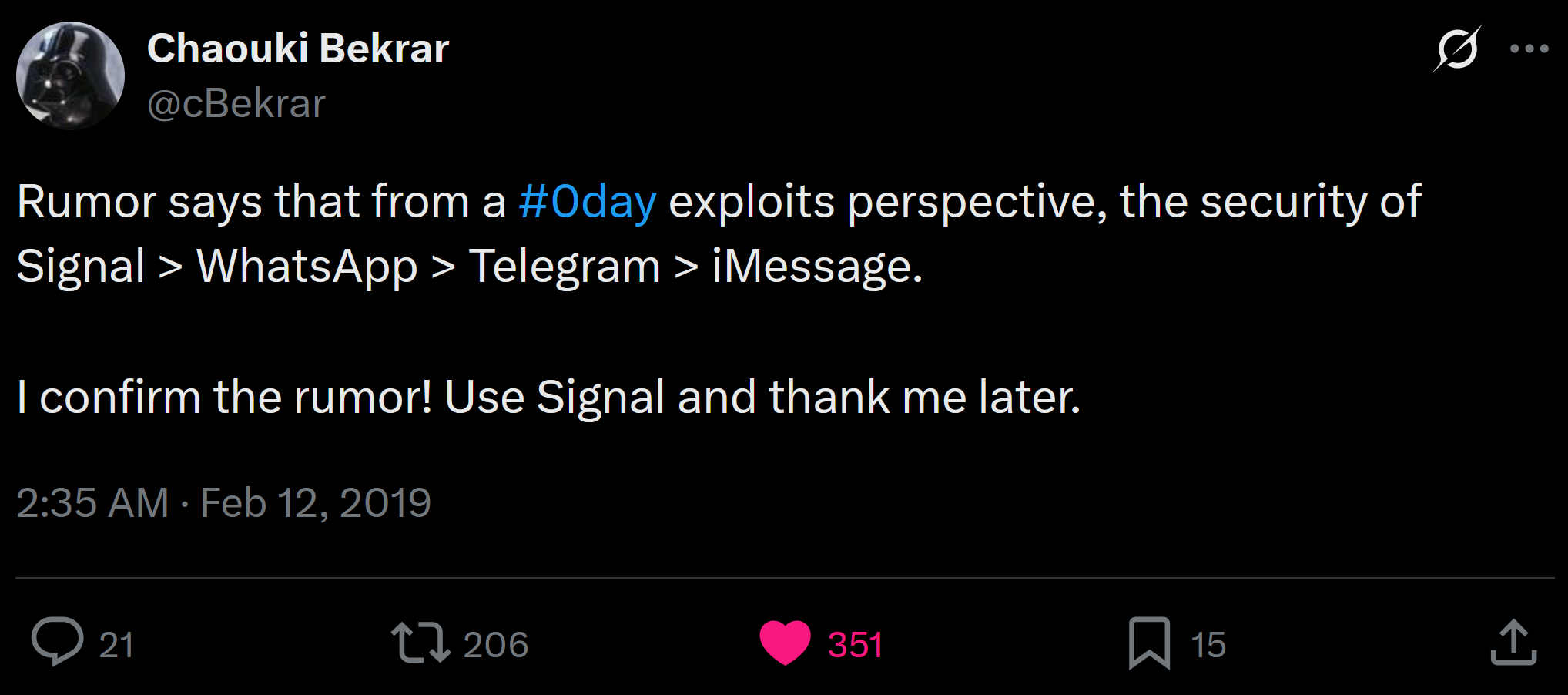
Bonus info: Tweet from Chaouki Bekrar (screenshot)
Missing features
There are two features which friends of mine are still missing in Signal.
1. Pinned messages (or notes) in group chats
Not missing anymore! Signal introduced pinned messages in January 2026 in both 1:1 chats and group chats. You can pin messages for 24 hours, 7 days, 30 days, or forever.
2. Ability to lock the Desktop Messenger app (e.g. at work computer)
One practical downside of Signal Desktop is that it does not have an app-level “screen lock” or PIN prompt after inactivity. This matters especially on work computers where IT administrators may have monitoring tools, or in shared spaces where you might step away for coffee.
The oldest feature request dates back to 2015 and was denied back then.
- Add option to lock the application [github.com]
The issue continues to be requested by users, for example in this 2021 discussion:
- Locking Signal Desktop [privacyguides.net]
A workaround could be to store Signal in an encrypted container (e.g. with VeryCrypt) and then closing the app and locking the container everytime you leave your desk.
Perhaps the discrepency comes from different privacy-law standards. Example:
Employee privacy in Germany
In Germany, random, covert “remote-watching” of an employee’s live desktop (just to see what you’re doing) is against the law. That kind of viewing is a form of employee monitoring and therefore processing personal data, so the employer needs a clear legal basis and must follow GDPR principles like purpose limitation, necessity, proportionality, and transparency.
In the employment context, the main legal hook is § 26 BDSG (employee data processing), which allows monitoring only if it’s necessary for the employment relationship, and sets a high bar for covert measures, especially where they resemble surveillance.
Employee privacy in Taiwan and elsewhere
Taiwan’s core privacy law is the Personal Data Protection Act (PDPA), but workplace monitoring is handled more through “general privacy principles” and “proportionality” than through detailed employee-monitoring statutes. Legal commentary emphasizes “advance notice”, which mainly means: your employer is going to let you know in advance (i.e. as a stipulation in the work contract) that they will generally reserve the right to monitor you (to check you for abuse), and there is nothing you can practically do against it.
LINE, which enjoys a de-facto monopoly in Taiwan, Japan and South Korea, has a “PIN lock-out” feature in their desktop messenger for exactly this reason.
It’s not that simple
Of course, there is logic in refusing to develop such a feature. Signal’s encryption and privacy must be above any doubt. If they made a lock-out feature, people would want to rely on it, so it must be air-tight. That requires more than just hiding a screen interface. It’s about memory access, data encryption on the SSD and being able to do this under a number of operating systems with ever-changing regulatory frameworks (Windows and MacOS keep clamping down on what developers can do inside their OS in terms of screen access and security).
Development funds are limited and are focused on maintaining the core infrastructure and mobile apps.
On the other hand, there might also be less awareness for work-related privacy issues in the Signal development team. And the refusals to develop such a feature date back to 2015 and 2017 on Github, which is basically ancient history. Users who don’t trust their employer’s IT admins might want to condition their donation to the Signal foundation to the development of this kind of feature. Perhaps it is time for a kick-starter style campaign…
But what about Matrix?
Matrix is an important open-source project that shares a similar philosophy with Signal – it would also score all the green checkmarks in my table above, just like Signal. But Matrix takes it a step further: Matrix has a fully decentralized multi-server architecture, similar to Mastodon. This makes it fully resilient against malicious takeovers or downtimes, but a decentralized architecture may also come with friction for the user experience.
There is a reason why Mastodon remains niche while Bluesky has grown quickly. People prefer things that “just work” without added complexity. And again, Signal can’t get taken down that easily either. If you don’t like it, you can fork it, just like any other open source project.
My view is that Signal remains the clear frontrunner among the privacy-respecting, open-source options. For normal person-to-person messaging, its centralization is actually a strength: one app, one nonprofit, one onboarding path, one recommendation you can give to friends and family without a lecture.
There is a reason why I start this article with “get your friends’ phone numbers”. This is the first step towards freedom and platform-independence, to break people loose from dominant commercial platforms.
Therefore, as an open-source enthusiast, I would urge fellow enthusiasts not to undermine Signal’s rise, just because it is supposedly not “pure enough” yet. Do not give into the urge of ideological fragmentation.
Matrix is great, no question: no single point of control, organizations can run their own homeserver, use their own domain, and keep control of their communication infrastructure. That makes it especially interesting for community chats, companies, and anyone trying to build something from the ground up. For such communities, it can replace Discord, IRC, TeamSpeak, Microsoft Teams, Slack, and similar tools.
Yes, it can also act as a private messenger.
But I would still tell almost everyone to start with Signal first. If you want to build something from scratch – or simply have a backup – Matrix is the ecosystem worth getting familiar with next.
Feel free to share this article with your friends and let me know what you think by reaching out. You can find my phone number and Signal contact on hello.tomfichtner.com.
This article is licensed under CC BY. 
If this article was helpful to you, please consider to buy me a coffee.
See also: contact information.