Miyoo Mini Plus retro game console (review)
Content
Prior reading
Retro game consoles (or homebrew consoles) are not a new thing. Early beginnings were the GamePark GP32 from 2001, followed by GamePark Holdings GP2X in 2005 and Dingoo A320 in 2009. Variety started to increase around 2017 with brands like Anbernic and Powkiddy, and then exploded during COVID-19 with countless brands and sizes.
Between current offerings, there are two fundamentally different approaches:
- CPU/PC-based (usually based on the “ARM” CPU architecture), i.e. a full computer on a chip, like in smartphones.
- FPGA-based, a niche architecture with flexibly reconfigurable logic-hardware that can recreate original console circuits; typically pricier, less PC-like, and potentially less power-efficient.
CPU-based emulation
They use low-power ARM processors – the same architecture found in most smartphones – to run emulator software that mimics the behavior of old consoles. This principle traces back to the 1990’s with PC-based emulators like ZSNES that allowed to run console ROMs on regular Windows or Linux PC hardware.
The advantage lies in flexibility and cost-efficiency – a single chip can emulate any number of systems through software updates. The downside: emulation accuracy can vary, depending on CPU power and how well the software replicates the original hardware timing and quirks.
FPGA-based emulation
FPGA-based systems (Field Programmable Gate Arrays) take a more purist route. Instead of running software that imitates the old hardware, FPGAs recreate the original circuitry itself – reconfiguring their internal logic gates to behave exactly like the chips inside old consoles. This means the emulation happens at the hardware level, cycle-accurate and virtually indistinguishable from the original consoles. The trade-off: they are typically more expensive, less flexible, and harder to modify.
Which one would I recommend?
Field‑Programmable Gate Array (FPGA) devices are widely deployed in industries such as telecommunications, automotive safety systems, aerospace defense (e.g., radar/satellite communications), and data-centre hardware acceleration.
The following analysis is based on these source: [1] [2] [3] [4].
Despite operating on a lower level, FPGA-based emulation might be less power-efficient than CPU-based emulation, meaning FPGA-based handhelds might require more power and in turn have lower battery life than CPU-based handhelds when running the same game.
The main reason for this is in the maturity and design principle of the underlying silicon: ARM-CPUs benefit from decades of mobile-device optimisation on an extremely large global volume (again: smartphones), and emulator software has likewise been optimized for decades to strive for better emulation performance.
FPGAs on the other hand traditionally have higher static power (leakage) and overhead because of the flexibility they provide in hardware. The programmable fabric inside an FPGA includes a large number of configurable logic blocks, multiplexers and routing switches, which may cause leakage of power even when idle.
Conclusion: Due to the high flexibility (run any software you want), efficiency and cost-effectiveness, I would generally recommend CPU-based emulation in handhelds.
What about input lag?
In PC gaming, I’m also a bit of a snob regarding input lag. You can’t argue with the fact that lower is better. But in handheld emulation, I’m willing to compromise.
FPGA-based emulators are claimed to be more accurate, but I haven’t done a side-by-side comparison. I’ll assume there are diminishing returns where more and more effort is spent on less and less noticeable differences. As long as you don’t hook up an old CRT TV to your emulator, you’re not going to be truly authentic anyway (CRTs have lower input lag than LCDs). Also, again, CPU-based emulators have come a long way.
But still, playing Super Mario Bros (e.g. Super Mario Bros All-Stars) always feels a bit wrong on an emulator. Perhaps I lost my muscle memory, or perhaps the slight input lag (or LCD response time) just is too much to make it feel natural. Generally, I wouldn’t recommend such precision platforming on emulation. On the other hand, older arcade based-titles like “Balloon Fight” (NES) and the SNES exploration shooter Super Metroid feel wonderful. Also, modern platformers like Celeste, which is available in its PICO-8 form, feel just right. I would recommend to just pick games that are appropriate for this kind of device. Just like I wouldn’t play a first person shooter with a gamepad (except Goldeneye 007, I have no regrets), I wouldn’t play Super Mario unless I had an absolute perfect system, running native code on a CRT or at least a TN or OLED panel (in LCD flatscreen panels, TN and OLED have lower input lag than IPS-type panels).
A comparison of input lag across a number of emulation handhelds can also be found here. The Miyoo Mini Plus is among the best on that list. It can be further improved on consoles like NES, SNES, up to GBA by using the “Preemptive Frames” feature in RetroArch, as discussed in this and this thread. To enable this setting, run the game, then hold Menu+Select at the same time to access the RetroArch setting menu, then enable either “Run Ahead” or “Run Preemptive Frames” with up to 3 preemptive frames. These settings are stored per game, so you can enable or disable it for each game individually.
This feature might reduce battery life slightly. There is no comprehensive list of which setting has the best result (and which battery life impact) for popular games on the Miyoo Mini Plus.
Run-head was introduced in 2018; preemtive frames in 2023.
Now for the actual review…:
Miyoo Mini Plus
Official website is here, but I got it second hand (barely used).
After spending a few weeks with it, I can confidently say that I’m happy with my 50 EUR second-hand purchase. I got the black, semi-transparent one. Here is the front:
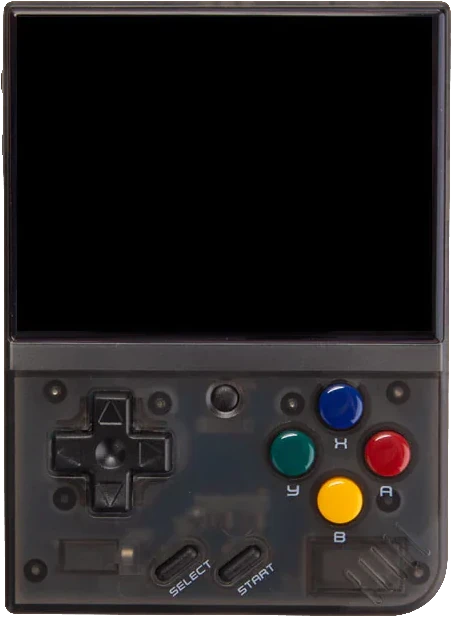
And the back:
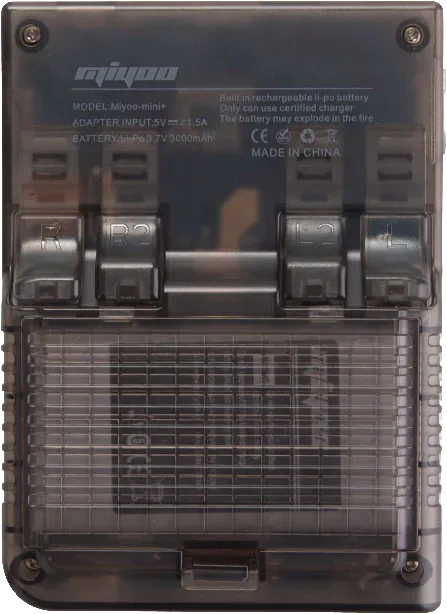
It has 4 shoulder buttons on the back (I only need 2) and the battery can be removed/replaced without screwdriver. The CE logo seems a bit stretched on their print, but it seems to have the correct proportions at least.
Hardware and user experience
The hardware feels good: the overall build is solid, the input buttons and D-Pad are reliable and have the right amount of travel distance and resistance to them. When I tap on the display, is rattles a little bit, as if it lacks adhesive. But I attribute this to the “easy to repair” design philosophy in mechanical engineering, where they would rather not use adhesives to glue everything down, and also don’t have the space to put screws everywhere (the LCD only has very narrow bezels). So I’m OK with this, and I wouldn’t tap on the screen during normal use anyway (it’s not a touch screen).
The display feels crisp and vibrant. It’s amazing how sharp a 640×480 resolution can look like on a 3.5″ screen. It’s larger than the original Gameboy screen (2.5″) and it seems to just fill the sweet spot between immersiveness and portability. When playing the 3D PS1 game Colin McRae Rally 2.0 on it, the relatively high pixel-density makes me forget the inaccurate polygon and texture rendering of the PlayStation; the smooth sixty frames per second blend the game into an impressionistic, animated work of pixel art.
Battery life is good enough – it lasts for multiple hours, longer than I would ever think to play in one sitting, even with demanding games such as the aforementioned Colin McR. rally game. Charging the battery works like a charm with my laptop’s >100 W USB-C power supply, which supports the full range from the modern 20 V USB-PD standard (used by laptops, including MacBooks) down to the 5 V standard (established since USB 1.0 in 1998) that this handheld computer requires.
The headphone output, auto-standby, auto-hibernate, state-saving and auto-resume features all work flawlessly. Audio volume can be adjusted in-game with the toggles on the side of the device, LCD brightness can be adjusted by pausing the game with the center “Home” button and then using the D-Pad, without having to enter any menus. Or, even faster: while the game is running, hold the “Home” button and use the volume rocker on the left side to adjust brightness. But beware: holding the “Home” button also unlocks many other shortcut combos (e.g. save states on D-Pad, fast forward mode on R1), that you may press accidentally if you are not careful. Hold “home” and press all buttons one by one to familiarize yourself with these shortcuts.
Here is a 1min video (animated GIF) to show the menu and user experience of the Miyoo Mini Plus with OnionOS:
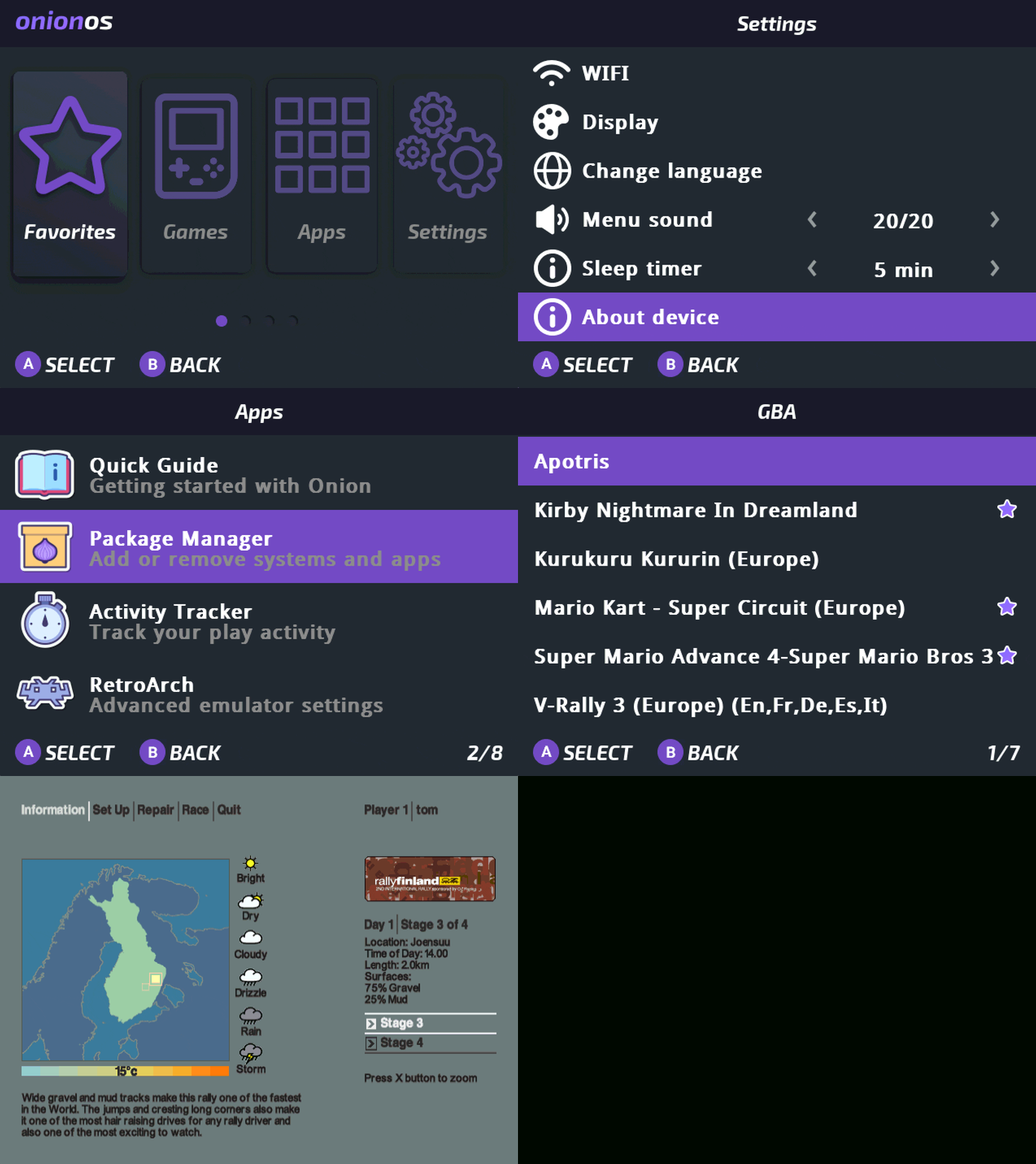
The operating system OnionOS (donate here) is fast, clean, and intuitive. ROM management and emulator organization are intuitive enough, as long as you know how to handle a folder structure. OnionOS already comes with all kinds of emulators pre-installed, but they are hidden by default to avoid cluttering your start menu. You can easily enable (unhide) them in the OnionOS setup menu by selecting the appropriately named packages from a well-curated list, separated between “validated” (recommended) packages and some extra packages for expert users (e.g. special versions of emulators optimized for certain games or mods).
Performance
Long story short: it runs everything at stable framerates, up to PlayStation 1 (aka “PSX”) titles, but no Nintendo 64 or later.
I was actually very surprised about the PlayStation performance. Again, I only tested Colin McRae Rally 2.0, but this is already one of the more ambitious titles in the PlayStation catalog that renders large worlds with diverse biomes and lighting effects.
Playing a professional-grade rally simulator on a fanless handheld the size of a wallet is just mind-blowing.
On original PS1 hardware, this game ran at only 30 FPS – it seems to run at 60 FPS on the Miyoo Mini Plus, out-of-the-box with the standard PS1 emulator, without any tweaking required. Just this result alone justifies the device’s purchasing price for me. The high frame-rate really adds to the immersiveness and competitiveness of this title, and the fact that it can run this game on battery for hours without noticeable heat-up might make this game my main title on this handheld (yes, I’m a bit of a Rally nerd, always have been).

This experience gave me a new appreciation for how well-optimized classic console games were. Colin McRae 2 existed on PC too, but running it on a PS1 emulator with fewer dependencies and smaller memory footprint – outperforming a hypothetical, more generalized PC port of the same game – is genuinely impressive.
Granted, the game does cause slightly higher battery consumption compared to simpler NES titles, but it’s not a night-and-day difference. I might do a proper battery-life test with this game later and update this article.
Ergonomics
Just like the decision to not include joysticks (more on that below), the small form-factor is an intentional decision that comes with advantages and trade-offs. The compact form makes it extremely portable, but long play sessions can be tough on the thumbs. For example, in Colin McRae, I’m pressing buttons pretty much non-stop, and I do have to stretch my fingers between stages (a stage usually lasts between 3 and 5 minutes). More forgiving games like Tetris and Balloon Fight, where you have regular intervals of just floating and waiting, are less demanding on your thumbs – even just letting go of the buttons for a second or two every now and then makes a big difference for how long a play session can last on this device.
So, I wouldn’t recommend it for marathon games like Zelda, Final Fantasy, or Chrono Trigger, but for quick, adrenaline-fueled action or puzzle-games, it seems to be just perfect to me.
(I never played Chrono Trigger; maybe I’ll give it a chance one day on this device. I used to be more of a Terranigma kind of guy.)
Connectivity and multimedia
File transfers are easy over an HTTP web interface, if both devices are in the same Wi-Fi network. Maybe one day someone will port LocalSend to OnionOS, which has become my go-to open source tool to airdrop files between Windows, Android and Mac on the same Wi-Fi.
There is also FTP, SSH, Telnet, VNC on the device – all disabled by default (Apps → Tweaks → Network).
Running the VNC server might decrease FPS slightly, especially with heavy games (see photo in previous paragraph). But VNC is more like for remote administration, not for real-time streaming. It’s not a video broadcasting platform.
The device does not have built-in bluetooth functionality, but I don’t really care about this; I don’t like Bluetooth headphones anyway. I use these, because my phone has a headphone jack as well. Weird flex, I know.
The headphone jack in my Miyoo Mini Plus was quite stiff at first, but I like that. Better than being too loose. The fact that the port is on the bottom of the device is not ideal, but it does not interfere too much with my handholding.
Ride into the sunset
Now, you have a device with a proper operating system, good screen and headphone jack: why not use it as a slightly oversized MP3 player! And sure enough, there is an app for that. You can even play movies on the little screen. It’s not IMAX, but watching old seasons of The Simpsons as a bit of peaceful background noise while being on the job? Each their own.
But here’s the bummer: you currently can’t play media while playing a game. My use-case would have been to transfer some recent longform podcast episodes (via webinterface) to the device, then listen to them on headphones while driving through the northern provinces of Finland and Sweden, with in-game music and announcer disabled.
For context: the system comes with built-in background daemons (SSH, VNC, etc., mentioned above), so the OS does have some form of multitasking capability. Whether or not this limitation extends to shared use of the audio hardware, I don’t know yet. Overall, as of 2025, music playback seems to be a quite recent development.
The Miyoo Mini Plus only has 128 MB (megabyte) of DRAM memory – it’s absolutely legitimate to have limitations with multitasking.
(DRAM memory is the working memory, the electronic brain’s thinking space. Not the storage space on your SD card.)
Still, you can freeze any task (app, emulator, game) and switch to another, and switch back with relative ease and very little waiting time, but you can’t run two tasks (apps, emulators, games) at the same time.
For comparison, smartphones on the same “ARM” architecture usually have 2 GB at minimum, premium models start at 6 GB or more, Windows with office and web browsers is barely usable below 16 GB. So the RAM capacity of this handheld is less than 1% of that of a properly equipped laptop. It’s crazy to imagine how much this device can cram into this tiny footprint. May I mention Colin M.R. one more time here? Also, having so little memory is a huge boon for energy efficiency and battery life, so I’m all for it.
To be continued…
Unexpected gem
Discovering Balloon Fight on the NES was a highlight – an absolute classic I had overlooked. On the Miyoo Mini Plus, it’s pure, joyful simplicity. The physics feel super relatable for such an old game, the way you can build momentum in flight, bounce off of walls, maintain momentum when hitting ground, it just feels right. On top of the normal battle mode, the “Balloon Trip” mode is procedurally generated, it’s fair, it’s tough, every demise is your own fault. It’s super easy to learn and hard to master, like all good games should be.
Who needs joysticks anyway?
The choice to not include joysticks perfectly fits the included performance: all consoles after the original PlayStation came with joysticks by default, and most of their games were designed to be played with joystick, so they wouldn’t be fun on the Miyoo Mini Plus anyway. So, it is fitting that this system’s performance tops out at PS1 level.
I like the fact that it does not have joysticks, because I can just throw it into my jacket’s pockets without having to worry about squishing or interlocking the joysticks with other pocket clutter. I can step on it on the carpet (bare feet) without breaking it. It’s a proper “fire and forget” device.
This is not your N64 nostalgia machine, nor is it a universal gaming handheld that could be adapted to play modern mobile-friendly titles like Fortnite. If gaming is your passion (and you don’t have a PC, pleb), you might want to get a Steam Deck instead. The Miyoo Mini Plus is for short bursts of adrenaline (or dopamine) on-the-go, for people who ain’t got the time to play games for hours a day anymore (insert tiny violin sounds here).
Homebrew and ROM hacks
The community support around Miyoo Mini Plus is fantastic. The homebrew games and ROM hacks I tested ran perfectly, from modernized, esports-friendly versions of Tetris, quality-of-life improvements and fan translations for JRPGs, to full conversions of classics like Mario Kart and Star Fox, the possibilities are endless and the wealth of content just keeps growing.
Ambitious projects like Star Fox EX (watch this trailer now; I’ll wait) will require you to overclock the SNES SuperFX chip emulation. Apparently clock increase factors of 10x are not unusual. Such settings are not exposed in the graphical user interface, so you will have to edit config files on the SD card directly. So, if you want to go beyond playing classic originals, there is still ample opportunity for manual tinkering (I have even seen someone boot Windows 95 out of a MS DOS emulator). But overall, OnionOS makes the Miyoo Mini Plus an overwhelmingly user-friendly daily driver, once you have your preferred consoles and games in place.
Not tested yet
Multiplayer (netplay), Overclocking, Playing while charging. The latter is theoretically possible, but I probably wouldn’t recommend it – no need to stress the tailor-suited electronics any more than necessary. Give it a break, charge at home, play when it’s full.
Verdict
The Miyoo Mini Plus is a tiny marvel. It’s not meant to replace full-size consoles or cutting-edge handhelds – it’s a retro pocket companion that nails the fundamentals: excellent emulation, gorgeous screen, solid input, top-tier portability, and a luxurious, community-driven operating system in OnionOS (donate here; I did) that fits well into the tiny DRAM space without any issues.
If you value quick, high-quality retro gaming with surprising depth and flexibility, the Miyoo Mini Plus is hard to beat, IMHO.
Rating: ▰▰▰▰▰ (5 / 5)
Best for: arcade enthusiasts, travelers, and anyone who wants to carry a couple of their all-time classics in their pocket.
Previously owned: Data Frog SF2000. A chip burned during tinkering with alternative emulation cores while charging. Yeah, I’ve done that. Wouldn’t do that again on a $12 device. Also, wouldn’t buy that again. Screen and form factor was nice, but the horsepower under the hood can’t even run Mario Kart at 30 FPS, generally struggles with “mode7” SNES games. The Miyoo Mini Plus has at least a bit of meat on the bone, the SF2000 is somewhat fossilised and not able to live on its own. Let’s see how long my Miyoo lasts.
This article is licensed under CC BY. 
If this article was helpful to you, please consider to buy me a coffee.
See also: contact information.